
Drawing the Map Before the Journey
In the last post, I tore out Streamlit and cleared the ground for something new. That felt good. 5,942 lines deleted, a clean project structure, momentum building. The temptation was to start building immediately. Open a terminal, scaffold some React components, wire up an API route. Get something on screen.
I didn't do that. Instead, I opened a blank document and started writing a plan.
The Rewrite Trap
There's a well-known pattern in software called the second system effect. You build something scrappy that works, learn from its problems, then rebuild it "the right way." Except the rebuild keeps growing. You add features the first version never had. You redesign things that were working fine. Months later you're still rebuilding, and the researchers who depended on the original tool are waiting.
I'd seen this happen on other projects. A migration that was supposed to take weeks stretching into months because nobody wrote down what "done" looked like. I didn't want that for Manuscript Alert. The people using this tool need it to keep working while I improve it.
So before writing any new code, I sat down and mapped out every step from where I was to where I wanted to be.
Where I Was Starting
After the Streamlit cleanup, here's what I had:
A FastAPI backend in a single server.py file, 688 lines long. It handled every API endpoint: paper searches, settings management, model presets, backup operations. All of it in one place. The server worked, but it had the same problem app.py had. Everything was tangled together.
A Next.js 15 frontend with React 19 and Tailwind CSS. This was already in place from earlier work, serving as a static export that FastAPI delivered alongside the API. It had basic pages but no real component architecture. More of a shell than a finished product.
All data stored as local files. Research settings lived in a Python file (config/settings.py). Backup snapshots were individual Python files with timestamps in their names. Model presets were JSON files. The paper archive was a single JSON blob. This worked fine for one person on one laptop, but it meant nothing was shared and nothing was searchable beyond basic file reads.
No automated tests. No CI pipeline. No deployment beyond running python server.py on a local machine.
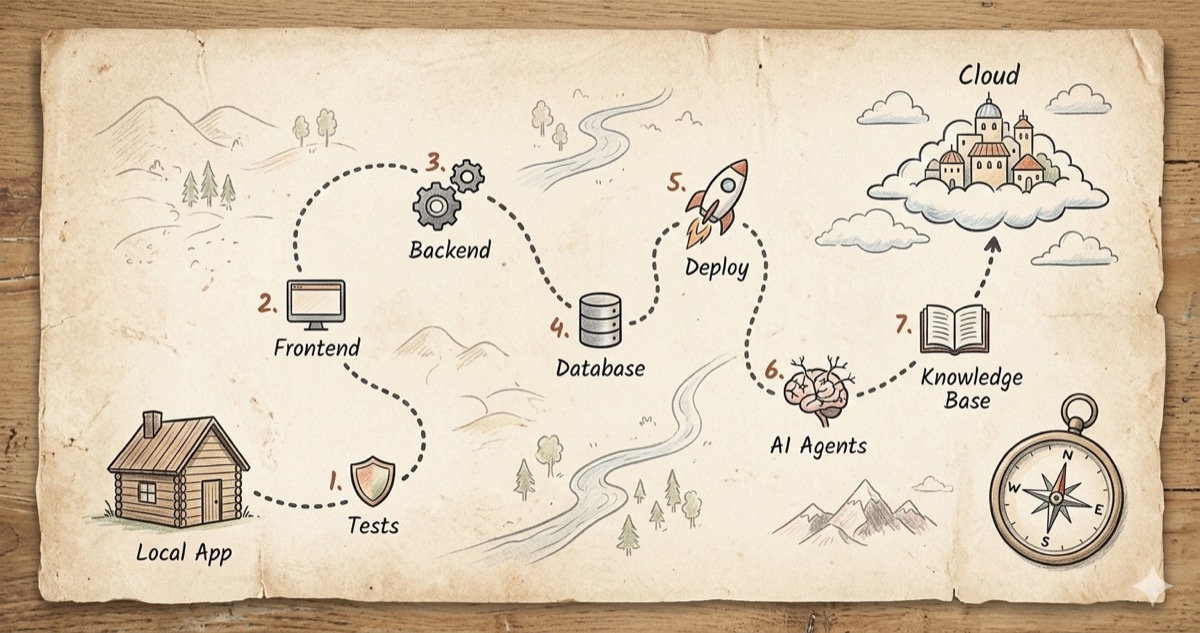
The Seven Steps
The plan fits on a single page. Seven steps, each one building on the last, each one leaving the app in a working state.
Step 1: Tests and CI. Before changing anything structural, build a safety net. Write tests for every API endpoint, every keyword matching rule, every settings operation. Set up GitHub Actions so tests run on every push. You don't renovate a house without checking which walls are load-bearing first.
Step 2: Frontend Redesign. Replace the shell with real components. A three-column layout with search controls, a paper feed, and a detail panel. Mobile-responsive from the start. This is the change researchers will actually notice.
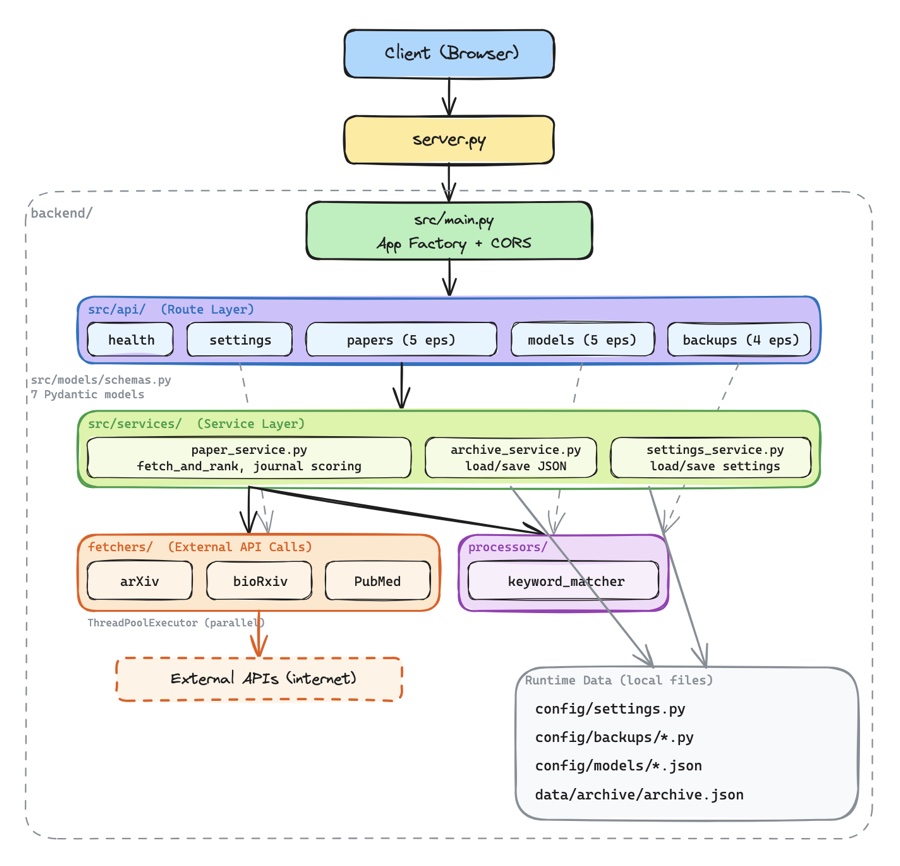
Step 3: Backend Restructure. Version the API. Split that 688-line server into focused modules. Add proper configuration management so the app reads settings from environment variables instead of hardcoded paths. Set up SSE (server-sent events) so the frontend can show real-time updates when the backend is processing.
Step 4: Database Migration. Move from local files to Neon PostgreSQL. Design tables for papers, settings, versioned settings snapshots, and model presets. Keep a local fallback so the app still works without a database connection. This is what makes the tool shareable across devices and team members.
Step 5: Cloud Deployment. Put it on the internet. Frontend on Vercel, backend on Render, database on Neon. Auto-deploy from GitHub so every merge to main goes live. The goal: researchers can access Manuscript Alert from anywhere, not just the laptop where it's installed.
Step 6: AI Agent Pipeline. This is where it gets interesting. Instead of just matching keywords, build a pipeline of specialized agents that can understand research context, fetch from multiple sources in parallel, deduplicate results, and summarize trends. Seven agents working together through LangGraph, with real-time activity streaming to the frontend so researchers can watch the process happen.
Step 7: Knowledge Base. The final piece. Let the system remember what you've read. Upload PDFs, embed them with SPECTER2 (a model trained specifically on scientific papers), store the embeddings in Pinecone, and use them to find new papers that connect to your existing research. Personalized discovery instead of generic keyword matching.
Why This Order
The sequence isn't random. Each step protects the next.
Tests come first because everything after that involves restructuring code. Without tests, you don't know when you've broken something. The frontend redesign comes before backend changes because it gives researchers an immediate improvement while I work on deeper structural changes behind the scenes.
The database migration comes after the backend restructure because clean, modular code is much easier to rewire than a monolith. Deployment comes after the database because there's no point deploying an app that only stores data locally. And the AI features come last because they depend on a solid, deployed backend with real-time communication already in place.
At every step, the app works. Researchers can search for papers, adjust their settings, browse results. I'm renovating a house while people are still living in it.
Why This Stack
I landed on Vercel for the frontend, Render for the backend, and Neon for the database. Each choice came down to practical constraints.
Vercel is built for Next.js. Native hosting, automatic builds from GitHub, global CDN. I don't have to think about frontend infrastructure.
Render gives me a proper Python server with no timeout limits. That last part matters. The AI agents in Step 6 need to run LangGraph cycles that can take 30 seconds or more. Serverless platforms like Vercel's API routes have a 10-second timeout on the free tier. That's a dealbreaker for agent workflows.
Neon is serverless PostgreSQL. It gives me a shared database that multiple devices can connect to, with a free tier that covers my needs (512 MB). The branching feature is a bonus: I can test schema changes on a database branch before touching production data.
All three have free tiers that cover a small research tool. I'm not trying to scale to millions of users. I need something reliable for a team of researchers.
What 88 Lines Bought Us
The whole plan is 88 lines of markdown. It took an afternoon to write. But it gave me something worth more than any amount of code: a clear understanding of where I'm going and how I'll get there.
Every future decision can point back to this document. Should I add this feature now? Check the plan. Which step does it belong to? Is the foundation for it in place? If not, I know what to build first.
The next post covers Step 1 of the actual work: organizing the backend files into a structure that makes sense. It's less glamorous than AI agents, but you can't build a second floor before the ground floor is solid.