

Making Space for What's Next
In the last post, I gave the project clean boundaries by moving all the Python code into its own backend/ folder. From the outside, everything looked organized. But inside, one file was still trying to do the job of an entire team.
Imagine a restaurant where one person takes your order, cooks your food, runs it to the table, handles the bill, and cleans up after you leave. It works when there are three tables. It falls apart when the place gets busy.
That was our server.py. At 679 lines, it handled every single thing the app could do. When a researcher searched for papers, that file fetched them from three different databases, scored them, filtered them, and sent back the results. When someone saved their settings, same file. Exported results to a spreadsheet? Same file. Backed up their configuration? Same file. Every feature the app offered lived in this one place.
When "It Works" Holds You Back
The app ran fine. DK used it daily for his research. But every time we talked about adding something new (a better search experience, mobile support, real-time updates), I kept bumping into the same problem: touching anything in that file meant understanding everything in that file.
Want to improve how papers get ranked? You'd scroll past the backup logic, the settings management, the export feature, and the health check before you even found the scoring section. And once you made your change, you'd worry about whether you accidentally broke something three hundred lines away.
We had bigger plans for Manuscript Alert. A redesigned interface. Cloud deployment. Eventually, AI-powered paper discovery. None of that would be easy to build on top of a single file trying to do everything at once. We needed to make space first.
Giving Each Job Its Own Room
The idea was simple: instead of one file doing ten things, have ten files each doing one thing.
I went through server.py and grouped everything by what it was responsible for. The health check (is the server running?) got its own file at 15 lines. Settings management (what are my research preferences?) got 28 lines. The backup system (save and restore configurations) got 56 lines. Model presets (switching between different search setups) got 87 lines. And the paper search, the core of what researchers actually use, got 151 lines.
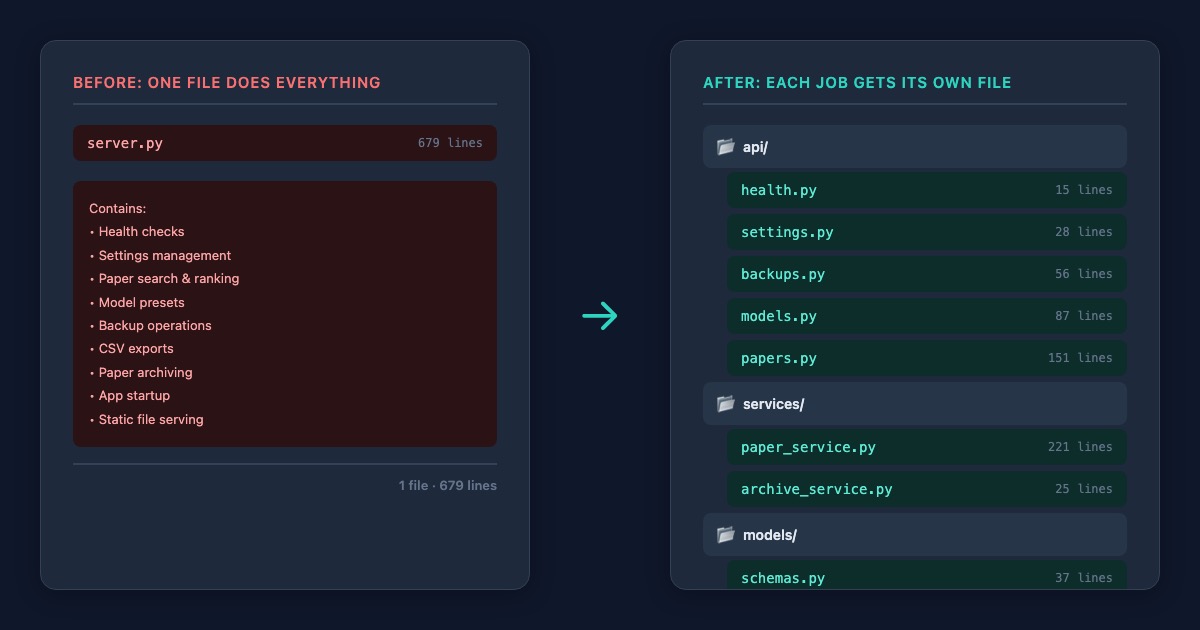
The biggest change was separating the "what to do when someone makes a request" logic from the "how to actually find and score papers" logic. Before, these were tangled together. A request would come in, and the same code that handled the web response would also dig into three databases, run keyword matching, calculate journal scores, and assemble the results.
Now the request-handling layer is thin. It receives a request, passes it to the part of the app that knows how to do the real work, and sends back whatever comes out. The paper discovery engine (221 lines, the heart of Manuscript Alert) lives on its own, focused entirely on finding and ranking research papers. No web stuff mixed in. No settings logic nearby. Just the core job: help researchers find relevant papers.
From 679 Lines to 27
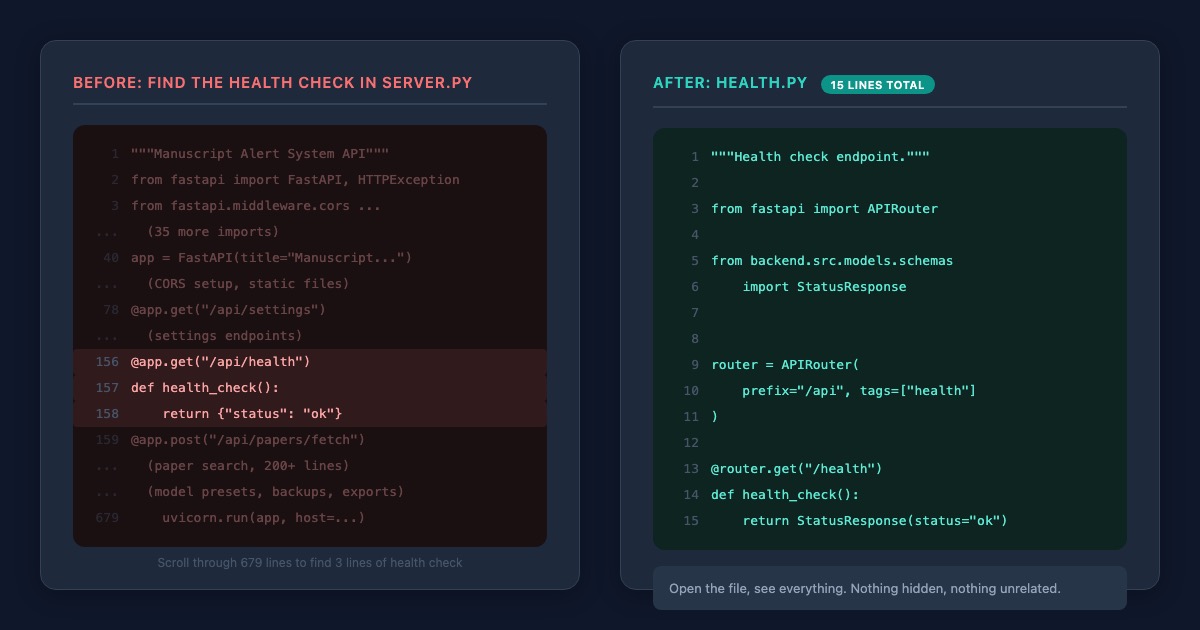
After the reorganization, the original server.py went from 679 lines to 27. It became a front door. Open it, and all it does is point you to the right room.
The app does exactly what it did before. Researchers wouldn't notice any difference. The same searches work. The same settings save. The same exports download. But now, when I want to improve the paper scoring, I open one file and that's all I see. When I want to add a new feature for managing backups, I know exactly where it goes without wading through unrelated code.
Making Sure Nothing Broke
Since we didn't have automated tests yet (those come later in the series), DK ran through his full daily workflow after the change. Paper searches across all three databases. Adjusting keyword weights. Switching between saved search configurations. Exporting results. Creating and restoring backups. Everything worked the same.
This had been our pattern through the whole reorganization: make a structural change, then have the person who uses the tool every day confirm that his research workflow still works. It's slower than automated testing, but it catches what matters most, which is whether the app still helps DK find papers.
Why This Matters
The total line count went up slightly. 816 lines added, 718 removed. But the complexity went down. Instead of one person doing ten jobs, you now have a team where each member has a clear role. When something needs to change, you know who to talk to.
More importantly, this created the room we needed. Adding a new feature now means adding a new file, not editing a 700-line one. The redesigned frontend, the cloud deployment, the AI features: all of those become much more realistic when each part of the backend is self-contained and easy to change independently.
Making space isn't glamorous work. But without it, everything that comes next would have been a fight against our own code.
What's Next
The pieces are separated, but they're still scattered at different levels inside the project. Next, I'll organize them into a clean package structure with clear separation between the application code, configuration files, and data storage.
That final bit of organization is the subject of the next post.