
Saying Goodbye to Streamlit
This is the first post in a series about migrating Manuscript Alert, a research paper discovery tool for Alzheimer's disease and neuroimaging researchers. The project is built and maintained by DK, with me contributing on the engineering side. This series documents the migration from a Streamlit prototype to a modern React + FastAPI application.
What Manuscript Alert Does
If you're a neuroscience researcher studying Alzheimer's disease, keeping up with new publications is part of the job. Papers come out constantly across PubMed, bioRxiv, and arXiv. Missing a relevant paper can mean duplicating work someone else already published, or missing a technique that could save months of lab time.
Manuscript Alert pulls papers from all three sources, scores them against your research interests using keyword matching, and presents the results in a single interface. Think of it as a personalized paper feed, tuned to your specific corner of neuroscience.
The Streamlit Era
Streamlit was the right call for the first version. It's a Python framework that turns scripts into web apps with almost zero effort. No HTML, no CSS, no JavaScript. You write Python, and Streamlit gives you a UI.
For a prototype, it was perfect. We had a working app in days. Researchers could search for papers, adjust their keyword weights, export results. The whole thing lived in a single file called app.py.
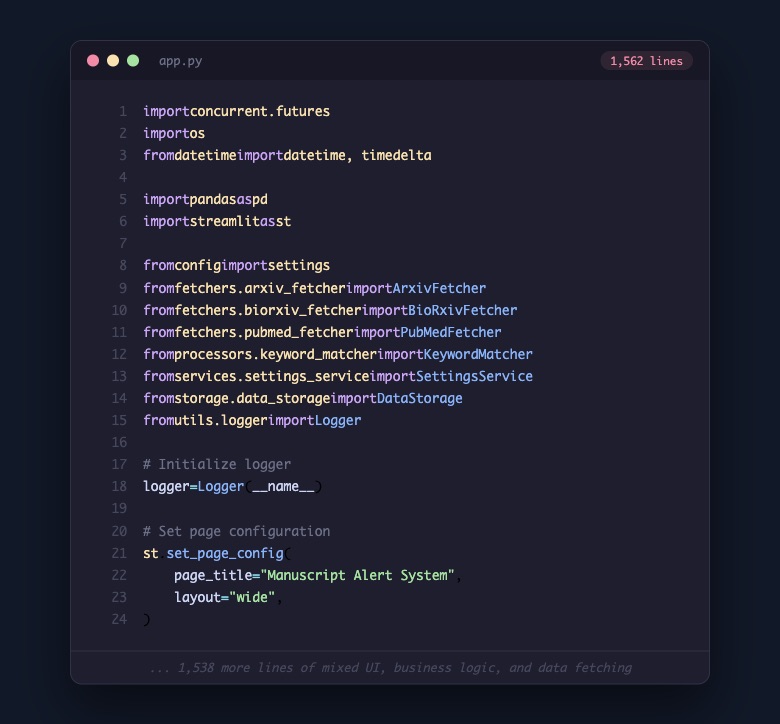
That single file did everything. It imported fetchers from three different paper databases, a keyword matching engine, a settings service, a data storage layer, and a custom logging system. Then it mixed all of that together with Streamlit's UI components. Search forms, result tables, settings panels, export buttons. All in one place.
For a while, it worked well. The researchers using it could find papers and that was what mattered.
Where the Limits Showed Up
The issues weren't dramatic. They were small things that added up over time as the user base grew and new requests came in.
A researcher wanted to check papers on mobile between meetings. Streamlit's layout doesn't adapt well to small screens. Another wanted a more customized way to sort and filter results. That meant touching the same 1,562-line file that handled everything else, from database queries to UI rendering.
We started noticing a pattern. Every feature request bumped against the same three walls:
Mobile access. Researchers aren't always at their desks. They read papers on the train, at conferences, between experiments. A desktop-only tool was becoming a real limitation for the people actually using it.
Design flexibility. Streamlit gives you a UI, but it's Streamlit's UI. You can't easily customize how paper cards look, how data flows between views, or how the interface responds to different workflows. For a tool people rely on daily, that lack of control matters.
Maintainability. With everything in one file, adding a feature meant understanding the entire system. DK and I would sometimes hesitate to touch app.py because a change in one area could ripple into something unrelated. That's not sustainable for a project you want to keep improving.
Choosing What Comes Next
This wasn't a snap decision. We spent time comparing options and talking through what the researchers actually needed.
We looked at several paths. Sticking with Streamlit and refactoring. Moving to Django. Trying Remix. Each option had tradeoffs. What tipped the balance toward React + FastAPI was a combination of practical things: React gives us full control over the frontend experience, including mobile responsiveness. FastAPI keeps us in Python for the backend, where all the paper fetching and scoring logic already lives. And the ecosystem around both is mature enough that we wouldn't be fighting the tools.
The deciding factor wasn't which stack was trendiest. It was which one would let us build the experience researchers were asking for. Mobile-friendly paper browsing. Customizable layouts. Real-time updates when new papers match their interests. Eventually, AI-powered discovery and a knowledge base. That roadmap needs a frontend framework that can grow with it.
The Cleanup
Once we committed to the direction, the actual cleanup was surprisingly quick. We weren't deleting the project. We were removing the Streamlit presentation layer and everything tied to it, so we could replace it with something better.
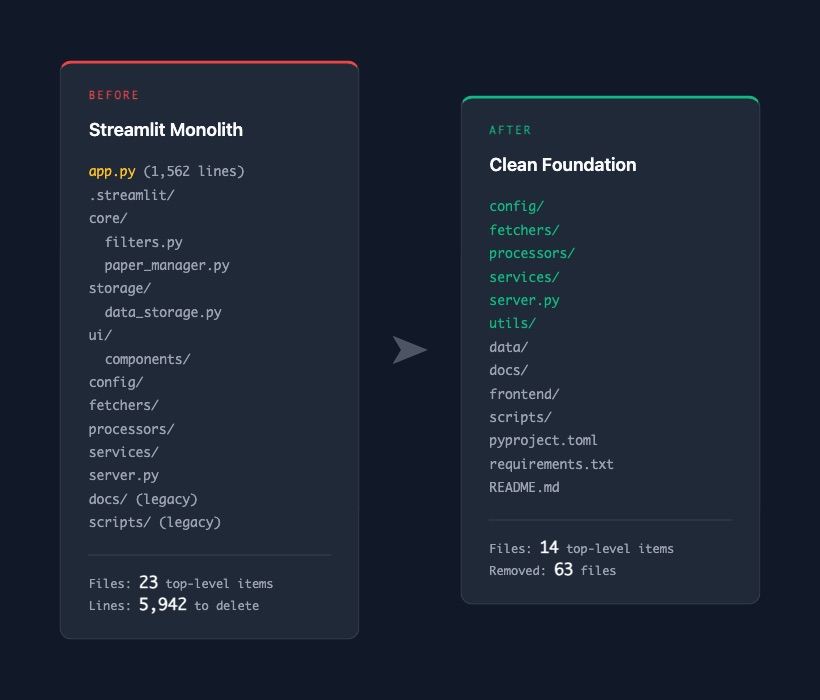
The core logic stayed. The fetchers that talk to PubMed, bioRxiv, and arXiv? Kept. The keyword matcher that scores papers against research interests? Kept. The services that manage settings and backups? Kept. The FastAPI server that was already running alongside Streamlit? Kept.
What we removed was the Streamlit-specific layer: app.py itself, the .streamlit/ config directory, the core/ module with its Streamlit-specific filters and paper manager, the storage/ layer designed around Streamlit's caching model, the ui/ components that only made sense in that context, and legacy scripts from an older deployment setup.
The final numbers: 63 files changed, 5,942 lines removed, 86 lines added. Those 86 lines were mostly updates to the README and gitignore.
A Cleaner Starting Point
After the commit, the project went from 23 top-level items to 14. Each remaining folder has a clear purpose. Fetchers fetch. Processors process. Services serve. Config configures.
More importantly, the codebase now reflects what Manuscript Alert actually is: a paper discovery engine with a clear backend, ready for a proper frontend. The Streamlit layer was a great way to get the tool into researchers' hands quickly, and it did that job well. But the needs outgrew what it could offer, and that's okay.
The researchers who use Manuscript Alert care about finding relevant papers quickly, reading them wherever they are, and trusting that the tool surfaces what matters. Building that experience means giving ourselves a foundation designed for it.
What's Next
This cleanup was step zero. Next, we'll map out the full migration plan: every step from here to a deployed React + FastAPI application with cloud hosting, AI-powered paper discovery, and a knowledge base that remembers what you've already read.
That plan is the subject of the next post.