
Automating Trust
In the last post, we built a safety net. 344 checks covering every endpoint, every scoring rule, every workflow DK relies on for his Alzheimer's and neuroimaging research. The net was comprehensive. But there was one problem: someone had to remember to stretch it out before each jump.
Imagine a building with the best fire extinguishers money can buy. One in every room, one for every type of fire. But no alarm system. The equipment sits in glass cases on the wall, waiting for someone to notice the smoke, walk to the right room, and pull the handle in time. The protection exists. It just depends entirely on someone being present when things go wrong.
That was us. We had 344 extinguishers. They worked when we remembered to reach for them. And we usually did. But "usually" is a word that hides every bug that ever shipped on a Friday afternoon.
The Gap Between "I'll Check" and "It's Checked"
Before this, we had a basic alarm. When code was pushed, it checked the Python files for style issues and ran the backend tests. It caught obvious problems: syntax errors, failed assertions, formatting violations. Useful, but limited.
It didn't know the frontend existed. It couldn't tell you whether a researcher could actually open the app, click through the tabs, and find their papers. It verified the engine but never checked whether the car still drives.
And the frontend had no automated checks at all. Every time something changed about what researchers see on screen, the only verification was DK opening the app and clicking around. He'd search for Alzheimer's and neuroimaging papers. Load a saved preset. Adjust keyword weights. Switch between tabs. If everything looked right, we'd move on. But he followed familiar paths, and the edge cases, the rarely-used features, the subtle interactions between parts he doesn't test together daily, those gaps only showed up when something important was at stake.
We were about to start building new features: a redesigned interface, cloud deployment, AI-powered search. The pace of change was about to pick up. We needed the full alarm system installed before the construction began.
Installing the Alarm
The new system catches everything, every time, without anyone asking it to.
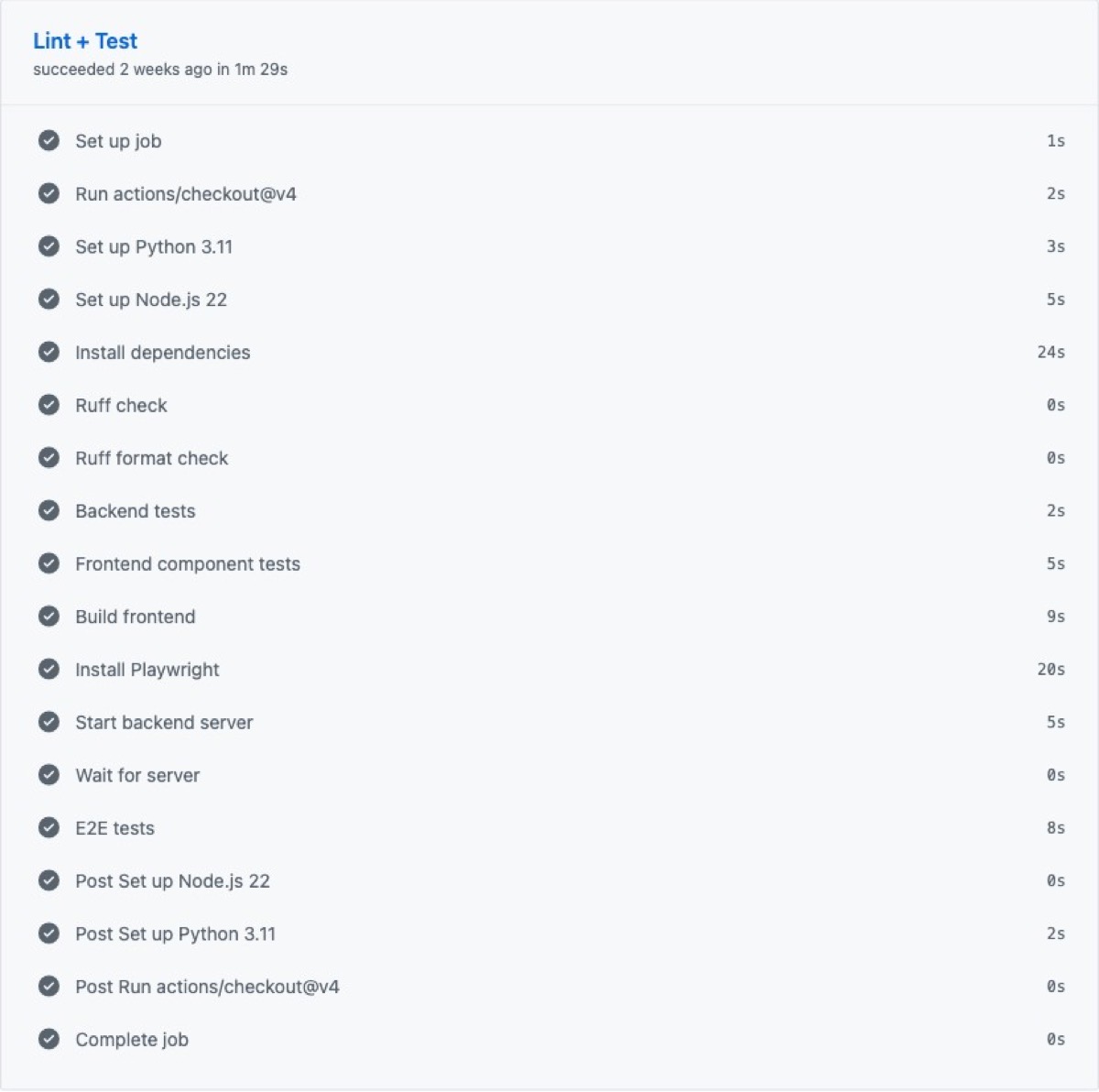
It starts with code hygiene. Every Python file gets reviewed for consistent style and formatting. Not because neatness prevents bugs directly, but because messy code is harder to read. Harder to read means easier to miss something that matters.
Then the backend tests. All 344 of them. API contracts, keyword matching, journal scoring, saved presets, backup operations. The same comprehensive checks from the last post, now running automatically on every push and every pull request. No one decides whether to run them. They just run.
Then something entirely new: frontend checks. Six test suites covering every major piece of the interface DK interacts with. The paper cards he scrolls through looking for relevant studies. The statistics sidebar showing how many results matched. The papers tab, the model presets tab, the settings tab. And the connection layer that ties the interface to the backend. More than 70 individual checks, each verifying that what a researcher sees on screen matches what the code intends.
After the component tests pass, the pipeline builds the entire frontend from scratch. If a change broke something badly enough that the app can't even assemble, this is where it stops cold.
And finally, the full walkthrough. A real browser opens, navigates to the app, and uses it the way DK would. It loads the homepage and confirms the title appears. It finds the three main tabs and clicks through each one. It verifies the data source toggles are present: arXiv, bioRxiv, medRxiv, PubMed. It checks the search mode options. It opens every Settings sub-tab (Keywords, Journals, Scoring, Backup) and confirms each one loads correctly.
It's the automated version of DK's daily walkthrough. Except it never skips a tab, never assumes "that part probably still works," and finishes in seconds instead of minutes.
Even the Alarm Needs Calibrating
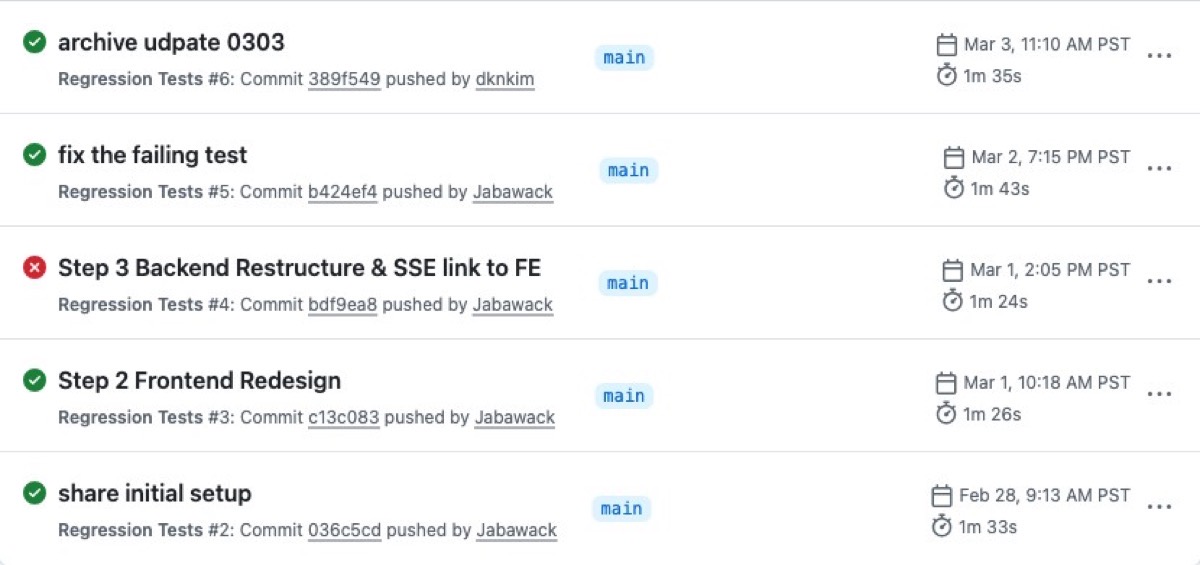
The pipeline didn't pass on its first run.
The style checker, now reviewing the full codebase with stricter rules, flagged formatting inconsistencies in configuration files that had been there for weeks. Trailing commas in the wrong places. Indentation that wandered. Lines stretched a few characters too long. Not bugs. Housekeeping that nobody had noticed because nobody had looked that closely.
You don't install a security system and expect every sensor to be perfectly tuned on day one. We cleaned up the formatting, told the checker to skip auto-generated files it had no business policing, and renamed the whole system from the generic "CI" to "Regression Tests." Because that's what it actually does. It catches regressions. It makes sure what worked yesterday still works today.
What Green Means
When every stage passes, a green checkmark appears. One small indicator that carries a lot of weight.
It means the code follows consistent style. All 344 backend checks pass. All 70-plus frontend checks pass. The app builds successfully. And a real browser can walk through the complete researcher experience without hitting a single problem.
It means DK's workflow is protected. His paper searches return the right results. His saved presets load. His settings persist between sessions. His backups restore cleanly. Every feature he depends on for his daily research, verified automatically, before any new code reaches the main branch.
Before, every change felt like hoping. Hoping you'd tested enough. Hoping the parts you didn't check were fine. Hoping the thing you changed at 11 PM didn't quietly break something three tabs away. Now the hoping is replaced by knowing. Green means it works. All of it.
Seven posts of organizing, splitting, consolidating, upgrading, testing, and automating. Each change invisible to researchers. The app looked and worked the same throughout. The foundation is set, and with the alarm watching, we can build on it with confidence.
What's Next
Everything so far has been behind the scenes. Researchers using Manuscript Alert wouldn't have noticed a difference. The next post is where the migration becomes visible: a completely redesigned interface, built on the clean, tested, automatically verified foundation we've spent seven posts laying down.